Upgrade Raw Food Shots Gemini Prompt With Generator
Upgrade raw food shots with Google Gemini AI Create clean studio style produce images with consistent lighting angles and backgrounds for catalogs
Get Started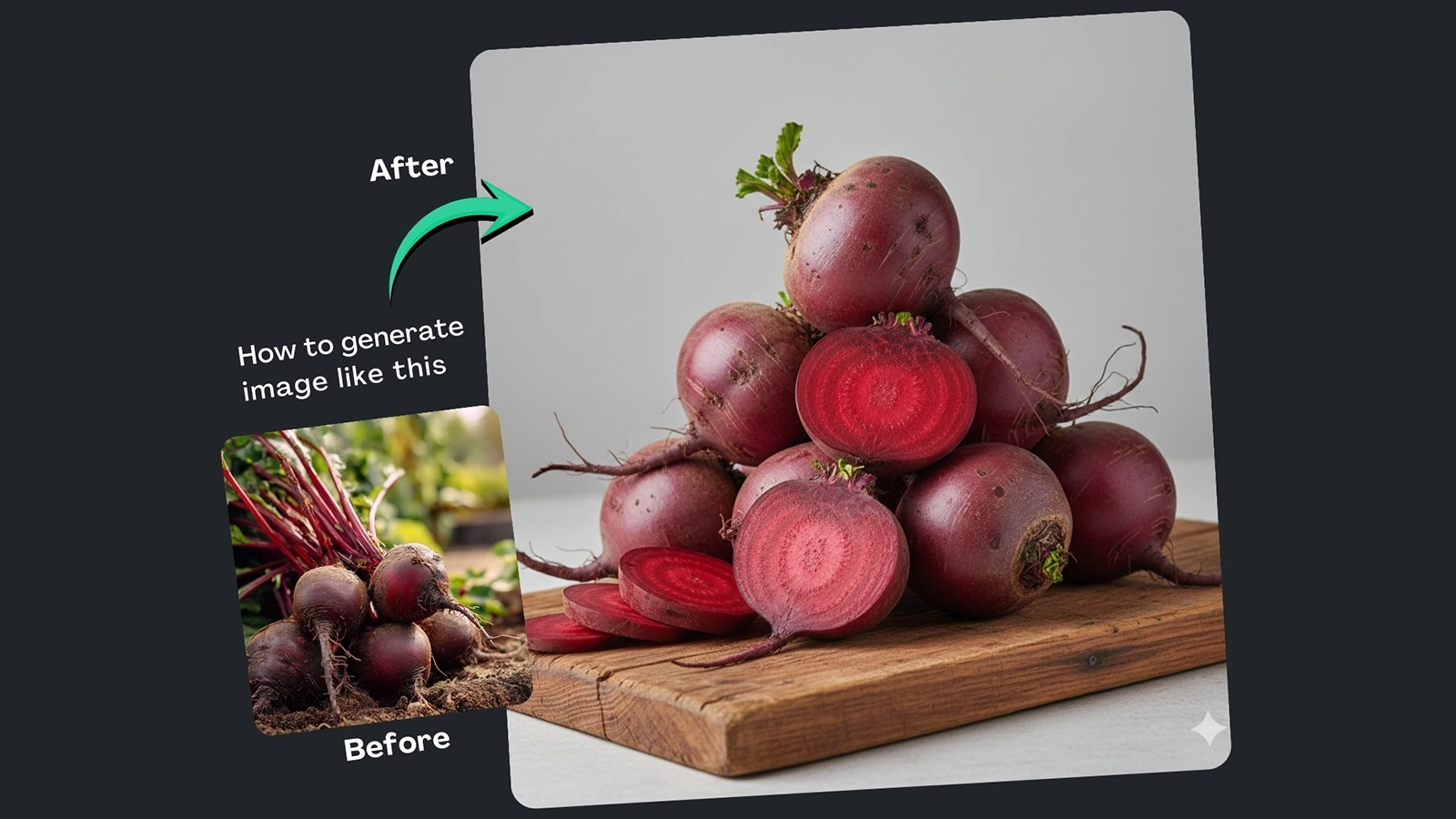


How It Works
Browse Prompts
Explore a wide collection of AI prompts curated by our experts. Find the perfect prompt that matches your vision.
Copy Prompts
Choose from ready-to-use AI prompts. Simply copy them with a click and get started without guesswork.
Create Stunning Design or Art
Paste the prompt into your favorite AI image generator (Midjourney, Google Gemini, ChatGPT Image, Stable Diffusion) and watch your ideas transform.
More Useful Examples for Upgrade Raw Food Shots Gemini Prompt With Generator
Vibrant Citrus Display for Online Catalogs
Exotic Vegetable Flat-Lay for E-Commerce
Cherry Tomatoes Close-Up for Grocery Listings
Crisp Leafy Greens Showcase for Catalogs
Colorful Pepper Bundle for Marketplace Listings
Fresh Root Vegetables Arrangement for E-Commerce
Juicy Grapes Close-Up for Product Catalog
Mixed Fruit Flat-Lay for Online Stores
Organic Carrots Studio Bundle for Catalogs
Farm-Fresh Avocado Close-Up for Marketplace
Fresh Strawberries in Elegant Studio Setup
Crisp Broccoli Single Showcase for Catalog
Red Apples Flat-Lay for Online Grocery
Colorful Mini Peppers Studio Bundle
Organic Kale Close-Up for Marketplace
-
For farmers, grocers, and online marketplaces, high-quality produce photos are essential—but often hard to achieve. Many rely on quick phone shots taken in inconsistent lighting or cluttered environments. The result? Raw food images that fail to highlight freshness, texture, and quality, making catalogs and product listings look unprofessional.
The Upgrade Raw Food Shots Gemini Prompt With Generator offers a smart, AI-powered solution. It helps transform basic produce images into polished, studio-style photographs that are clean, consistent, and ready for commercial use.
Why Use This Prompt and Built-In Prompt Builder
This is more than a prompt—it also includes a built-in prompt builder designed to simplify the process of creating uniform produce visuals. Instead of manually tweaking instructions each time, the builder lets you select options that control lighting, background, and composition with precision.
Powered by Google Gemini, the generator produces realistic textures and crisp detail while keeping fruits and vegetables visually accurate. This makes it ideal for e-commerce listings, farm catalogs, grocery apps, and food distribution platforms that need consistency across large product libraries.
How to Use the Prompt (Placeholder Breakdown)
Each placeholder is crafted to control a specific visual element:
-
[Produce Type] defines the featured item, such as apples, carrots, leafy greens, or tomatoes.
-
[Presentation Style] determines how the produce appears—single items for clarity, bundles for volume, or flat-lays for variety.
-
[Surface] sets the base tone, from rustic wooden boards to premium marble slabs.
-
[Lighting] influences freshness perception, whether through soft natural light or bright studio illumination.
-
[Background] keeps attention on the produce using clean whites, soft pastels, or neutral textures.
-
[Camera Angle] controls perspective, highlighting shape, texture, and detail.
-
[Aspect Ratio] ensures compatibility with catalogs, websites, and marketplaces.
Together, these elements create studio-quality images that look professionally photographed.
Final Thoughts
If you struggle with inconsistent or low-quality raw food photos, this AI-driven approach delivers a reliable upgrade. With a built-in prompt builder and Google Gemini’s realism, you can generate clean, uniform produce images at scale—saving time while elevating your brand’s visual credibility.
It’s a practical, modern solution for showcasing fresh food the right way.
-