Top AI Image Prompts for Vegan Leather Wallet Marketing
Generate high-fidelity imagery for sustainable men's accessories using precision-engineered prompts designed for realistic textures and sophisticated color palettes.
Get Started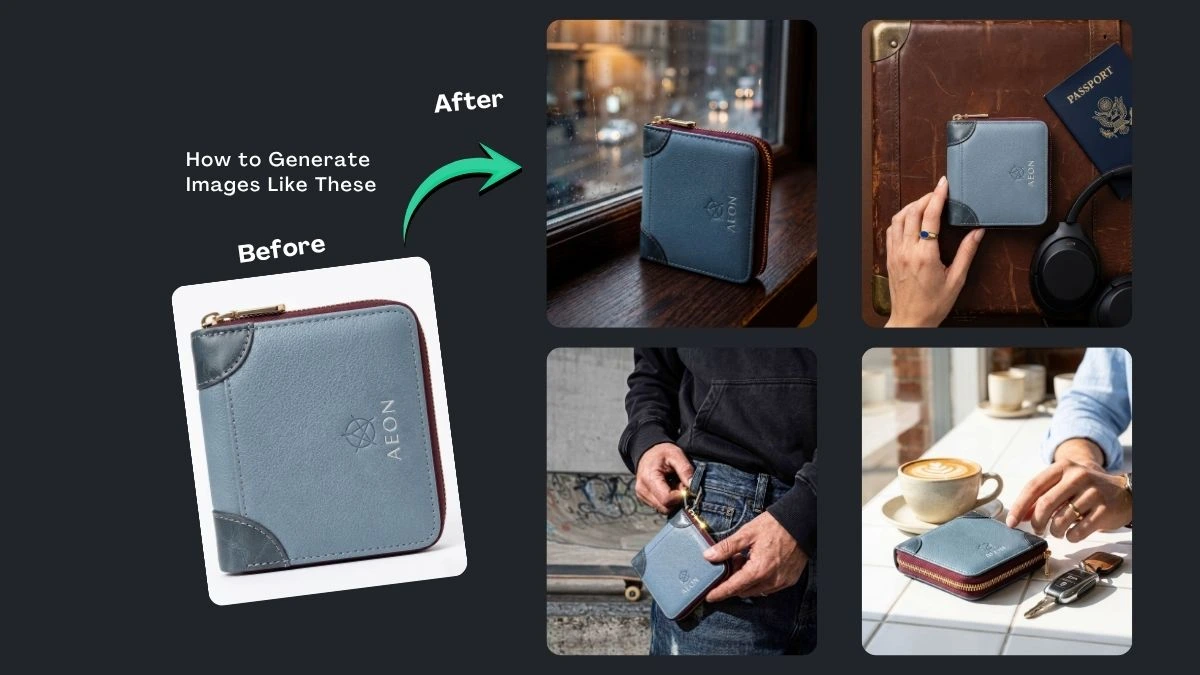
(12) Best Prompt Examples with AI Images

 Google Gemini
 Google Gemini
 Google Gemini
 Google Gemini
 Google Gemini
 Google Gemini
 Google Gemini
 Google Gemini
 Google Gemini
 Google Gemini
 Google Gemini

How It Works
Browse Prompts
Explore our extensive library of professional AI prompts to find the perfect artistic foundation. Discover a wide range of styles, from minimalist studio shots to high-fashion editorial concepts.
Customize Prompt
Make it yours by modifying the variables. Swap out materials, adjust the lighting style, or change the background setting to create a unique aesthetic that fits your specific brand or project.
Copy Prompts
Select the aesthetic that best aligns with your creative vision and copy the base prompt. Our optimized text structures ensure high-fidelity results across all major AI image generators.
Create Stunning Design
Paste your refined prompt into your favorite AI image generator (Midjourney, Google Gemini, ChatGPT Image, Stable Diffusion) and Watch your ideas are transformed into breathtaking digital masterpieces instantly.
The Ultimate Useful Prompts Collection
AEON Professional Lifestyle Pocket Carry
Shows the wallet being used by a professional to establish lifestyle value
AEON Geometric Floating Composition
Uses dynamic levitation and geometric shapes to create visual energy
AEON Executive Desktop Still Life
Pairs the product with premium office accessories to signal status and utility
AEON Macro Texture Showcase
Uses extreme close up focus to highlight premium vegan leather grains
AEON Urban Cafe Lifestyle
Places the product in a relatable social environment to build lifestyle aspiration
AEON Monochromatic Sky High Levitation
Uses an airy vertical composition to symbolize lightness and premium status
-
Elevating a brand in the sustainable fashion space requires visuals that capture the tactile essence of quality craftsmanship. These Vegan Leather Wallet AI Prompts are designed to help designers and marketers visualize product concepts without the need for expensive photoshoots. By focusing on grain, stitching, and hardware details, you can create professional-grade imagery that highlights the beauty of eco-conscious materials.
What Are Vegan Leather Wallet AI Prompts?
These are specific descriptive prompts used in generative AI tools to produce realistic images of non-animal leather goods. They define the "pebbled" or "smooth" texture, the specific hue—such as slate blue or deep charcoal—and the structural details like gold-tone zippers or reinforced corners. These prompts bridge the gap between a design concept and a stunning visual representation.
Best Use Cases
-
E-commerce Mockups: Preview how a new colorway will look before starting production.
-
Social Media Content: Create lifestyle imagery of wallets in everyday settings like cafes or offices.
-
Website Banners: Generate high-resolution hero images for sustainable fashion landing pages.
-
Pitch Decks: Provide investors with a clear vision of the product's aesthetic and quality.
How to Use
-
Select a Tool: Open your preferred AI image generator.
-
Input the Prompt: Copy one of the prompts above or customize the color and material details.
-
Adjust Parameters: Set the aspect ratio (e.g., 4:5 for Instagram or 16:9 for banners).
-
Iterate: Refine the description by adding words like "matte finish" or "vintage lighting" to match your brand style.
Benefits
-
Cost Efficiency: Eliminate the need for physical prototypes and professional photographers during the early stages.
-
Sustainability: Reducing the need for physical samples aligns with the eco-friendly ethos of vegan leather products.
-
Creative Freedom: Quickly test dozens of color combinations and textures in seconds.
FAQs
Can I change the color of the wallet in the prompts?
Absolutely. Simply swap "slate blue" for "tan," "forest green," or any hex code to see the AI adapt the lighting and texture to the new shade.How do I make the leather look more realistic?
Incorporate descriptive keywords like "pebbled grain," "cross-hatch texture," or "matte finish" to give the AI specific instructions on how light should hit the surface.Will the AI generate the logo correctly?
AI often struggles with specific text or complex logos. It is best to generate a clean, unbranded wallet and add your logo afterward using photo editing software.
Ready to transform your product visualization? Start using these prompts today to create stunning, sustainable fashion imagery that resonates with your audience.
-