Professional Electric Drill Photo Prompts
Elevate your hardware marketing and DIY content with high-quality, realistic power tool imagery designed for clarity and impact.
Get Started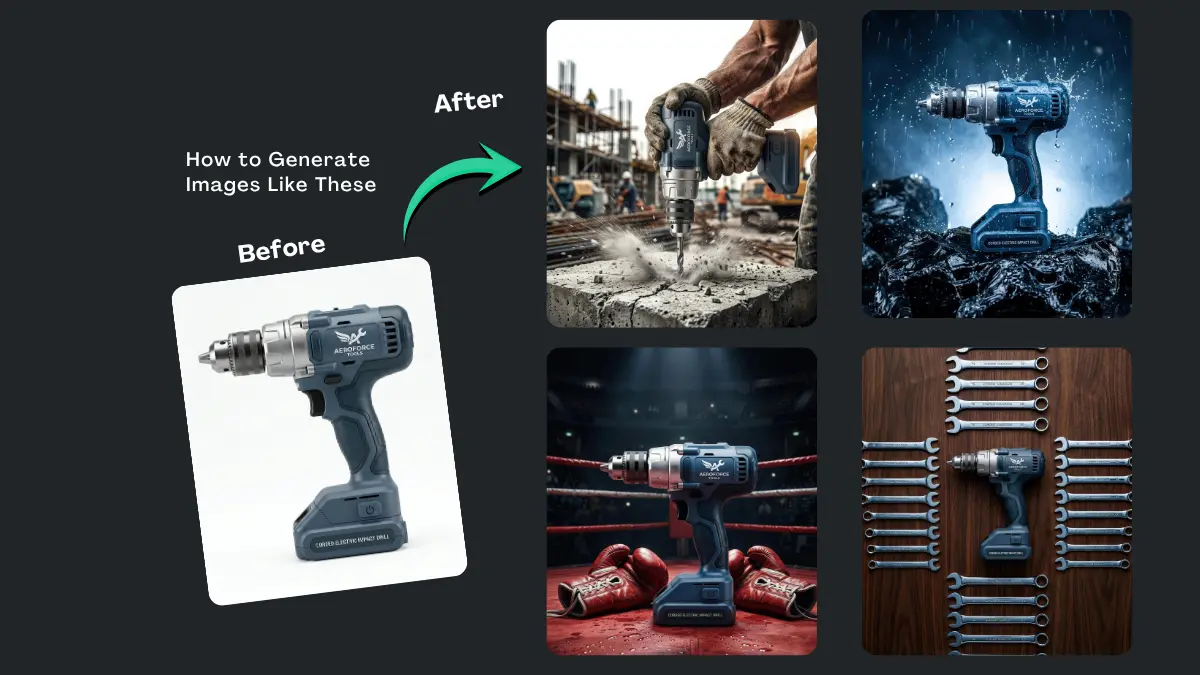


How It Works
Browse Prompts
Explore our extensive library of professional AI prompts to find the perfect artistic foundation. Discover a wide range of styles, from minimalist studio shots to high-fashion editorial concepts.
Customize Prompt
Make it yours by modifying the variables. Swap out materials, adjust the lighting style, or change the background setting to create a unique aesthetic that fits your specific brand or project.
Copy Prompts
Select the aesthetic that best aligns with your creative vision and copy the base prompt. Our optimized text structures ensure high-fidelity results across all major AI image generators.
Create Stunning Design
Paste your refined prompt into your favorite AI image generator (Midjourney, Google Gemini, ChatGPT Image, Stable Diffusion) and Watch your ideas are transformed into breathtaking digital masterpieces instantly.
The Ultimate Useful Prompts Collection
Industrial Force Dynamic Action Shot
Uses high speed photography techniques with environmental particles to create a visceral sense of torque and impact
Cinematic Tech Blueprint Visualization
Combines hyper realistic product rendering with digital neon overlays to highlight the advanced specifications of the tool
Rugged Weatherproof Extreme Metaphor
Creates a powerful visual metaphor of water and stone to symbolize the tool resilience and unstoppable nature
Precision Craftsmanship Lifestyle CloseUp
Focuses on a clean tactile domestic setting with warm lighting to emphasize precision and ease of use for home projects
Ultimate Torque Power Metaphor
Uses a creative metaphor of impact by placing the tool in a high intensity combat sports setting to symbolize raw strength
Flat Lay Workshop Organization
Uses a clean organized overhead aesthetic to appeal to perfectionist builders and professional organizers
-
In the world of hardware and construction, visuals need to convey power, precision, and reliability. Utilizing Electric Drill Photo Prompts allows creators, marketers, and designers to generate consistent, professional-grade imagery without the need for expensive studio setups. Whether you are building a product catalog or illustrating a "how-to" guide, these prompts provide the foundation for crisp, realistic tool photography.
What Are Electric Drill Photo Prompts?
These are specialized descriptive scripts designed to guide image generation tools in creating specific visual outputs. By focusing on textures like matte polymer, brushed metal chucks, and ergonomic grips, these prompts ensure that the generated electric drill looks like a professional-grade instrument rather than a generic toy.
Best Use Cases
-
E-commerce Mockups: Create lifestyle shots of tools in action for digital storefronts.
-
Instructional Blogs: Generate step-by-step visuals for home improvement tutorials.
-
Social Media Content: Produce eye-catching, high-contrast imagery for hardware enthusiasts.
-
Prototyping: Visualize different color schemes and ergonomic designs for tool manufacturing.
How to Use
-
Select Your Environment: Decide if you want a clean studio background or a rugged "on-the-job" setting.
-
Define the Details: Specify the tool's features, such as a keyed chuck, a textured grip, or a specific color palette (e.g., slate blue and silver).
-
Adjust the Lighting: Use terms like "dramatic shadows" for a powerful look or "soft diffused light" for a clean retail appearance.
-
Refine and Iterate: If the first result isn't perfect, tweak the descriptive adjectives to sharpen the metallic or plastic textures.
Benefits
-
Cost Efficiency: Eliminate the need for physical prototypes and professional photographers for every small update.
-
Consistency: Maintain a uniform visual style across your entire hardware tool lineup.
-
Speed: Go from a concept to a high-quality marketing asset in a matter of minutes.
-
Versatility: Easily change the setting, angle, or lighting of the tool to suit different platforms.
FAQs
Can I change the color of the drill in these prompts?
Absolutely. You can specify any color combination, such as "neon yellow and black" or "classic red," to match your specific project needs.Do these prompts work for cordless models too?
Yes, simply adjust the description to include a battery pack instead of a corded base to change the tool's power source visually.How do I make the drill look more "industrial"?
Focus on keywords like "heavy-duty," "matte finish," "brushed steel," and "weathered texture" to give the tool a more rugged, professional feel.
Ready to build a better visual library? Use these prompts to create stunning, professional tool imagery today. -