Portable Blender AI Prompts for Creative Design
Create viral ads with Portable Blender Prompts for Google Gemini. Master the art of AI product photography to show off sleek designs and fresh smoothies in ultra-realistic detail. Perfect for ecommerce and social ads.
Get Started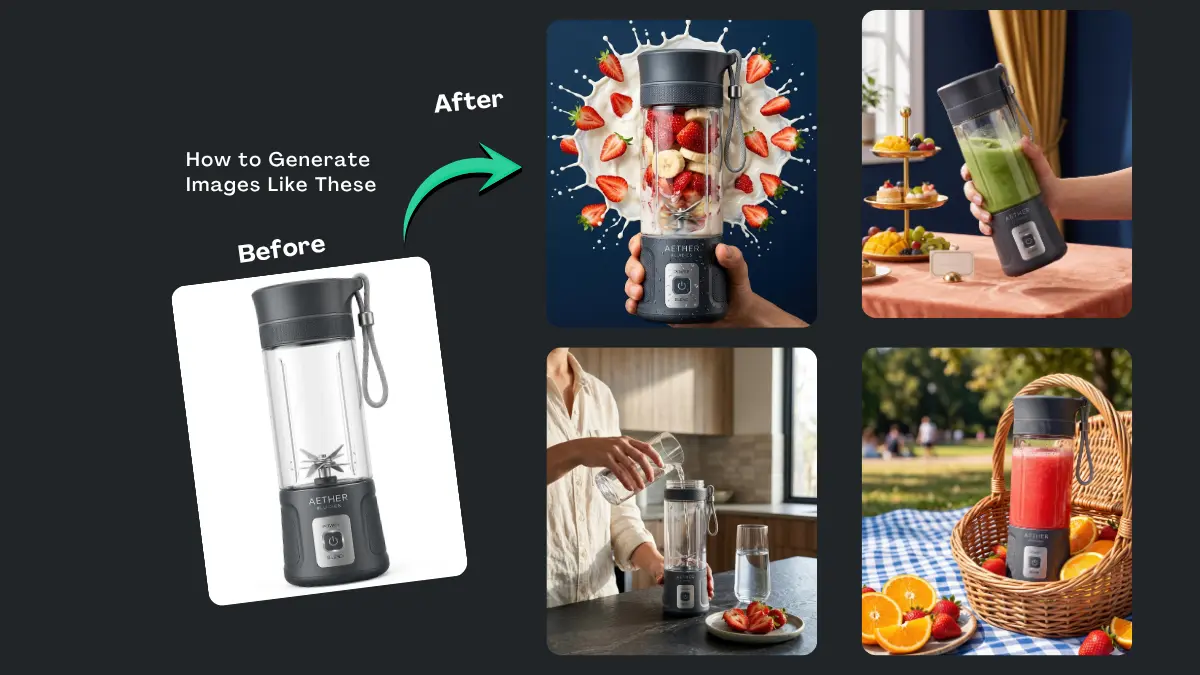


How It Works
Browse Prompts
Explore our extensive library of professional AI prompts to find the perfect artistic foundation. Discover a wide range of styles, from minimalist studio shots to high-fashion editorial concepts.
Customize Prompt
Make it yours by modifying the variables. Swap out materials, adjust the lighting style, or change the background setting to create a unique aesthetic that fits your specific brand or project.
Copy Prompts
Select the aesthetic that best aligns with your creative vision and copy the base prompt. Our optimized text structures ensure high-fidelity results across all major AI image generators.
Create Stunning Design
Paste your refined prompt into your favorite AI image generator (Midjourney, Google Gemini, ChatGPT Image, Stable Diffusion) and Watch your ideas are transformed into breathtaking digital masterpieces instantly.
The Ultimate Useful Prompts Collection
Vibrant Kinetic Splash Commercial
This prompt uses high motion liquid physics and floating fruit to create an eye catching energetic commercial look that emphasizes power and vitality
Minimalist Geometric Color Block
This prompt uses a playful monochromatic color blocking technique with geometric props to create a high fashion editorial look that feels vibrant and trendy
Fitness Wellness Vitality Portrait
This prompt integrates the product into an active morning routine featuring a sporty model ensuring the blender is viewed as essential vitality gear
Dynamic Gravity Splash Commercial
Uses hyper-realistic motion physics to show ingredients in mid-air, creating an energetic and mouth-watering commercial aesthetic.
Editorial Fashion Color Block Ad
Implements a sophisticated geometric color-blocking technique with a professional model to elevate the product to a luxury accessory status.
Gourmet Texture Close Up
Showcases a hyper-detailed, close-up view of dynamic blending with high-quality ingredients, visually proving the product's effectiveness.
-
In the world of digital marketing and product design, visual storytelling is everything. Utilizing portable blender AI prompts allows creators, designers, and marketers to envision sleek, functional kitchenware in diverse environments from high-end minimalist kitchens to rugged outdoor settings. By leveraging precise descriptive language, you can generate imagery that highlights the textures, portability, and power of these modern wellness tools.
What Are Portable Blender AI Prompts?
These are specific strings of descriptive text used to guide artificial intelligence models in generating high-resolution images of personal, battery-operated blenders. Unlike generic search terms, these prompts focus on lighting, material science (like brushed polymers or glass), and contextual backdrops to create professional-grade visual assets for mood boards, social media, or early-stage product conceptualization.
Best Use Cases
-
Social Media Marketing: Generate lifestyle imagery of a blender being used at a gym, office, or park without the cost of a full photoshoot.
-
Product Prototyping: Experiment with different colorways, finishes, and button interfaces during the initial design phase.
-
E-commerce Mood Boards: Establish a consistent visual theme for a brand's "on-the-go" wellness collection.
-
Content Creation: Create background imagery for health blogs and recipe websites that perfectly matches the aesthetic of the article.
How to Use
-
Define the Setting: Decide if the blender belongs in a kitchen, a backpack, or a travel scenario.
-
Describe the Materials: Specify textures like "matte silicone," "transparent polycarbonate," or "stainless steel blades."
-
Adjust the Atmosphere: Use keywords like "natural light," "studio photography," or "vibrant outdoor" to set the mood.
-
Refine and Iterate: Input the prompt into your AI tool and adjust the descriptors based on the initial results to get the perfect render.
Benefits
-
Cost Efficiency: Drastically reduces the need for expensive physical prototypes and photography sets.
-
Unlimited Creativity: Easily swap out ingredients inside the blender or change the background scenery in seconds.
-
High Resolution: Generate assets suitable for web banners and promotional materials.
-
Speed: Go from a conceptual idea to a visual representation in a matter of minutes.
FAQs
Can I change the color of the blender in the prompts?
Absolutely. Simply specify the desired color and finish (e.g., "rose gold metallic" or "forest green matte") within the prompt text.Do these prompts include technical specifications?
While prompts focus on visuals, you can include descriptive terms like "LED battery indicator" or "six-point stainless steel blades" to ensure those features appear in the render.Are these prompts suitable for all AI art generators?
Yes, these prompts are structured to work effectively with most leading AI image generation platforms.
Ready to transform your product visuals? Start using our curated prompts today to create professional, high-impact imagery that captures the essence of modern portability.
-